🔔 Important Product Update
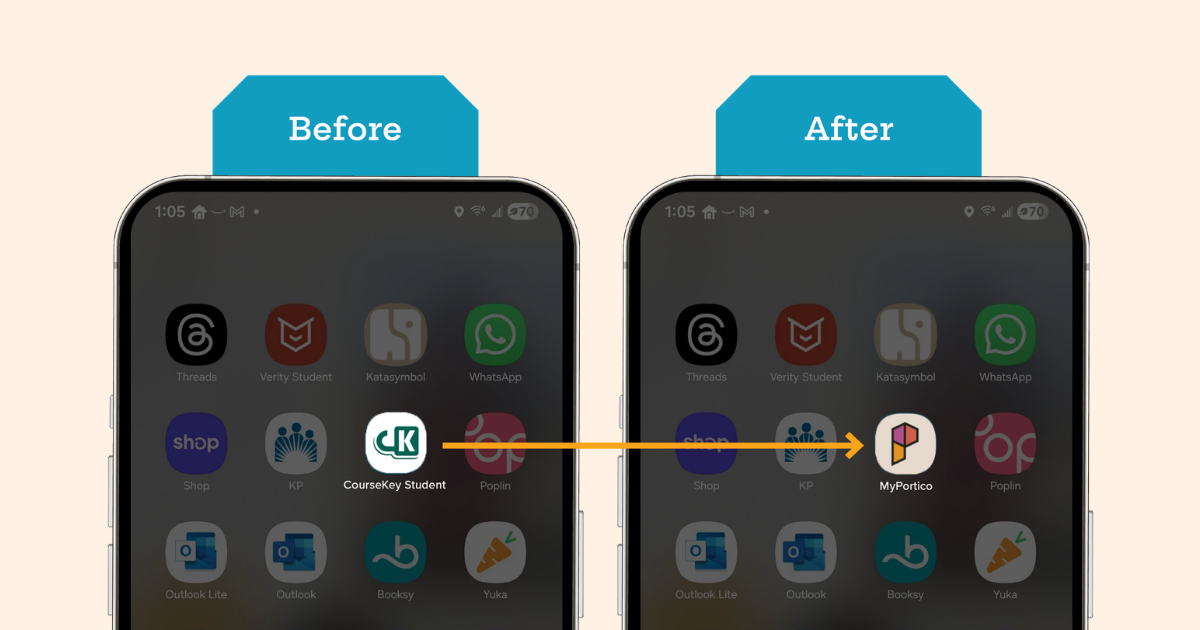
The CourseKey app is now MyPortico.
CourseKey is now part of Portico, a platform for managing the student lifecycle and experience. As part of this change, the CourseKey Student app is being renamed MyPortico.
Students will see a new app name and updated look starting in late April 2026, but the app experience will stay the same.
How to use the MyPortico app.
Updated Resources
- MyPortico Student Flyer
- Admin Guide: GPS Technology
- Admin Guide: QR Code Technology
- Admin Guide: QR Code + GPS
- Admin Guide: Sound Technology
- Instructor Guide: GPS Technology
- Instructor Guide: QR Code Technology
- Instructor Guide: QR Code + GPS
- Instructor Guide: Sound Technology
- Student Guide: GPS Technology
- Student Guide: QR Code Technology
- Student Guide: QR Code + GPS
- Student Guide: Sound Technology
Recommended Steps
-
Prepare updates to materials that reference CourseKey, including:
● Student guides and instructions
● LMS announcements
● Screenshots and training materials
● Posters or printed materials - Assets to update materials:
- Inform faculty and staff of the name change
- Notify students that the CourseKey app is being renamed MyPortico
New name, same app.
Starting in late April, the CourseKey app will appear as “MyPortico” on student devices. Most users will simply update their existing app to see the name change — no re-download required. The app itself will remain the same, with no change to how it works or to the students data, account, or logins.
What's changing: The app name and logo.
What's NOT changing:
How the app works,
Student logins, settings, and info,
Student data (attendance, skills, or payments details)
Need help?
If you have questions, contact the Portico support team.
Look for the name MyPortico instead of CourseKey Student.
That's it! No new account or setup is required. Make sure your app is updates starting in late April (your phone may do this automatically).

.png?hsLang=en)